You’re about to setup a private connection between your Google Docs, Sheets and a custom ChatGPT.
Paperclip HealthKit + Setup Guide
🔒 No extra apps, no new logins.


Watch the video walkthrough
1.Copy Your Templates
1.1 Copy Google Doc + Sheet templates
To get started, make a copy of the Google Doc and Google Sheet templates. These work out of the box and include some example data to get you started.
1.2 View your Apps Script
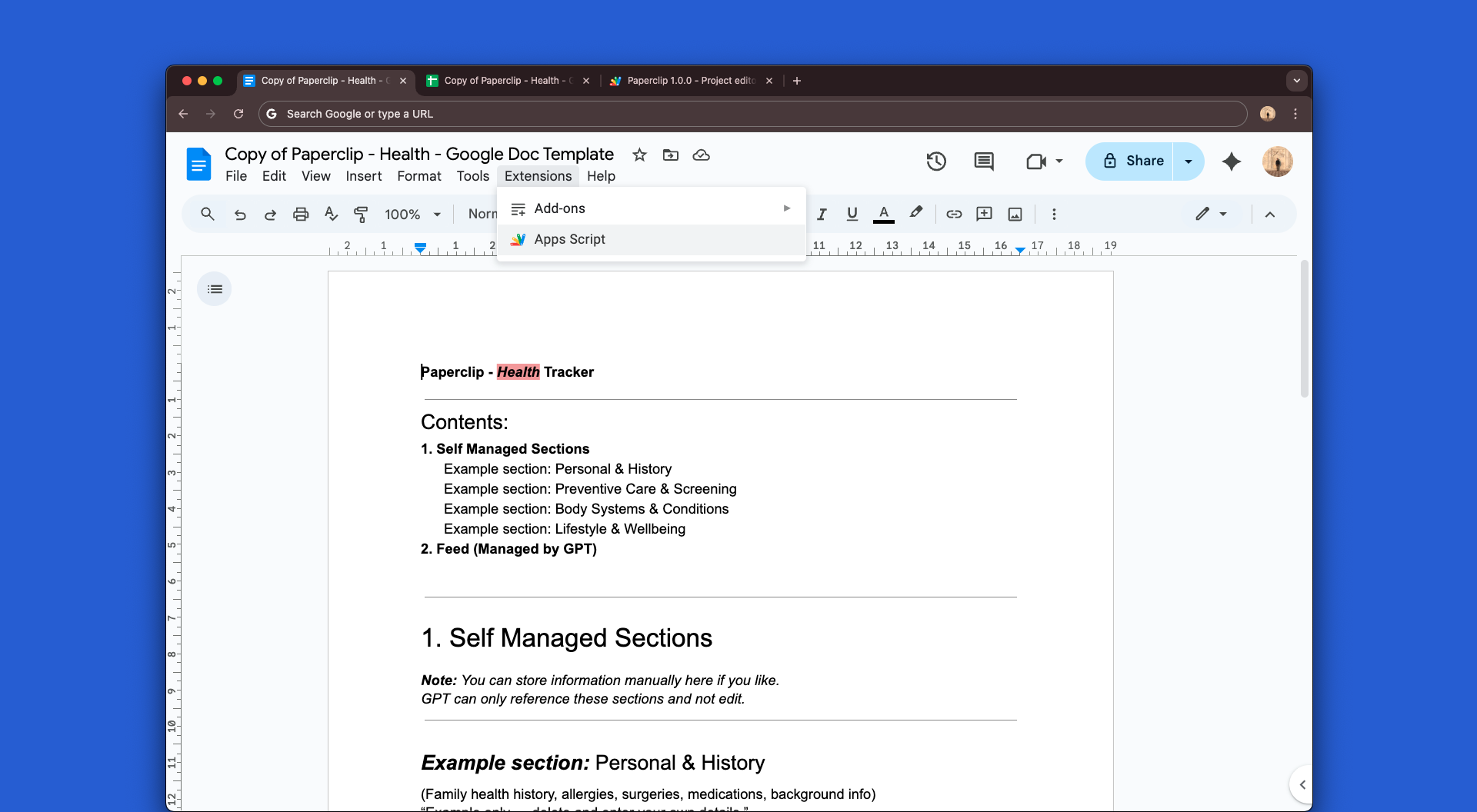
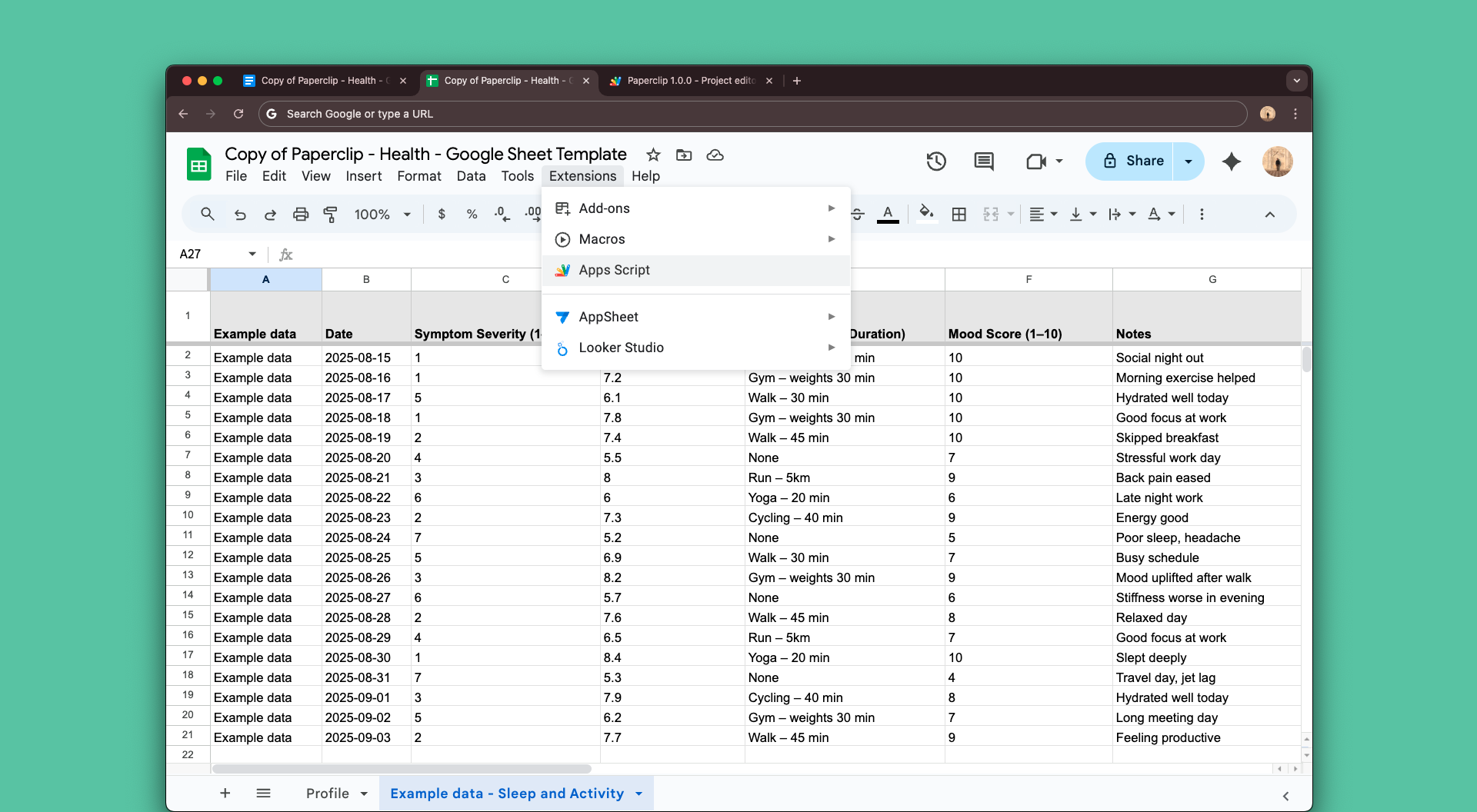
In either your new Doc or Sheet, click Extensions > Apps Script from the top menu to view your Apps Script
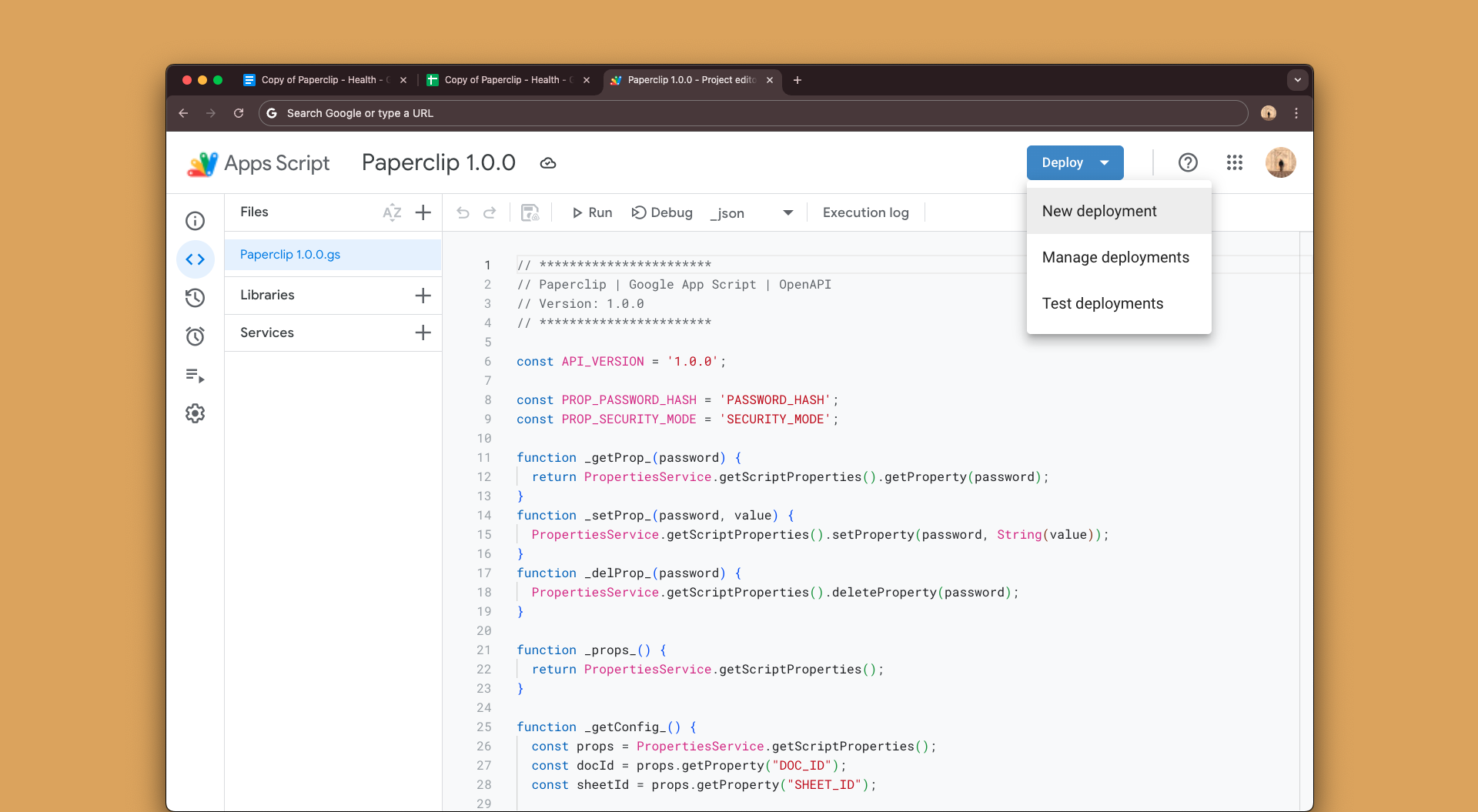
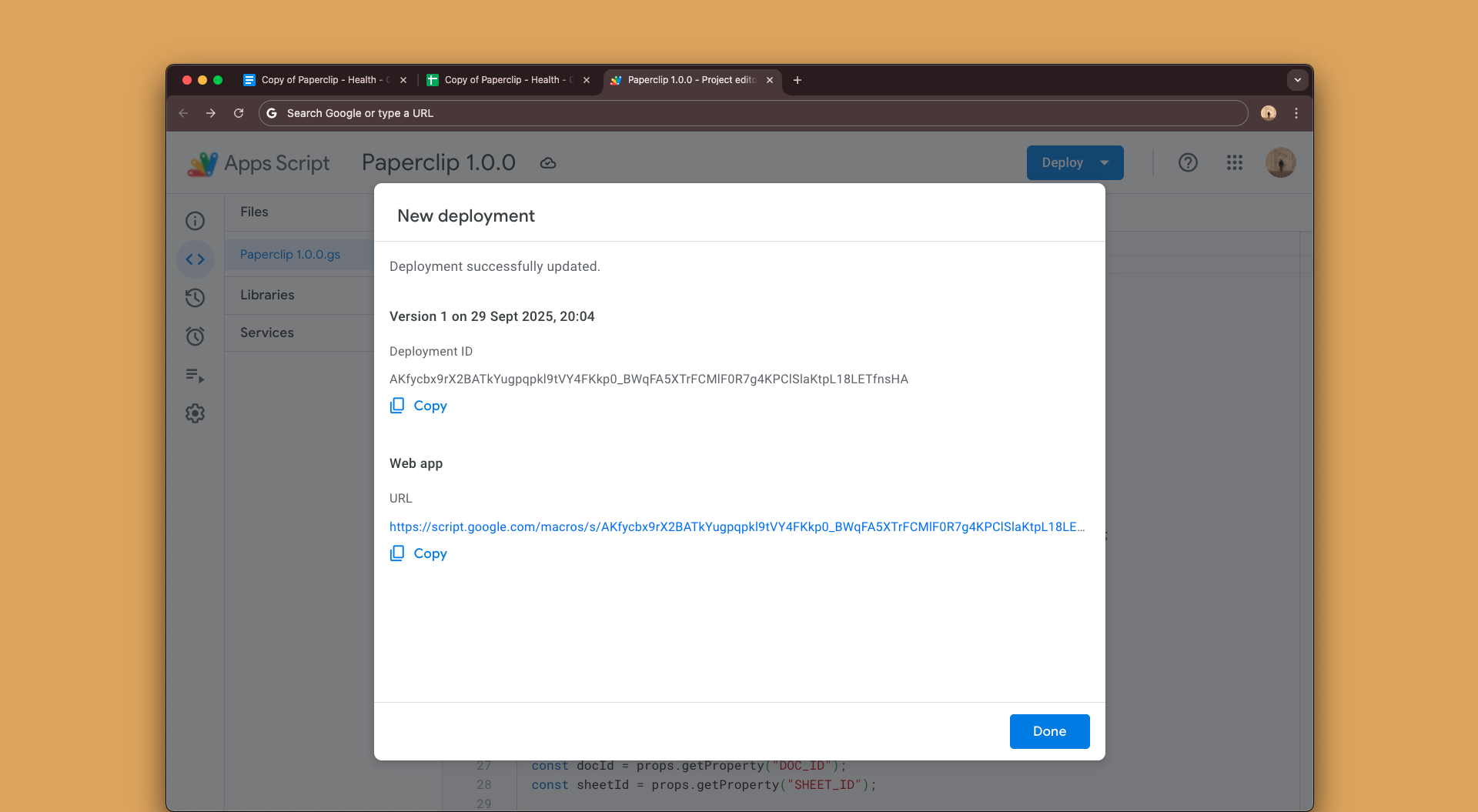
Click the blue Deploy button and > New Deployment from the drop down menu.
“Paperclip 1.0.0” is the current Apps Script version. This is your unique copy that was generated alongside your new Google Doc + Sheet templates. It privately links your documents to your custom GPT.
2.Publish Your Script
2.1 Deploy Your Script
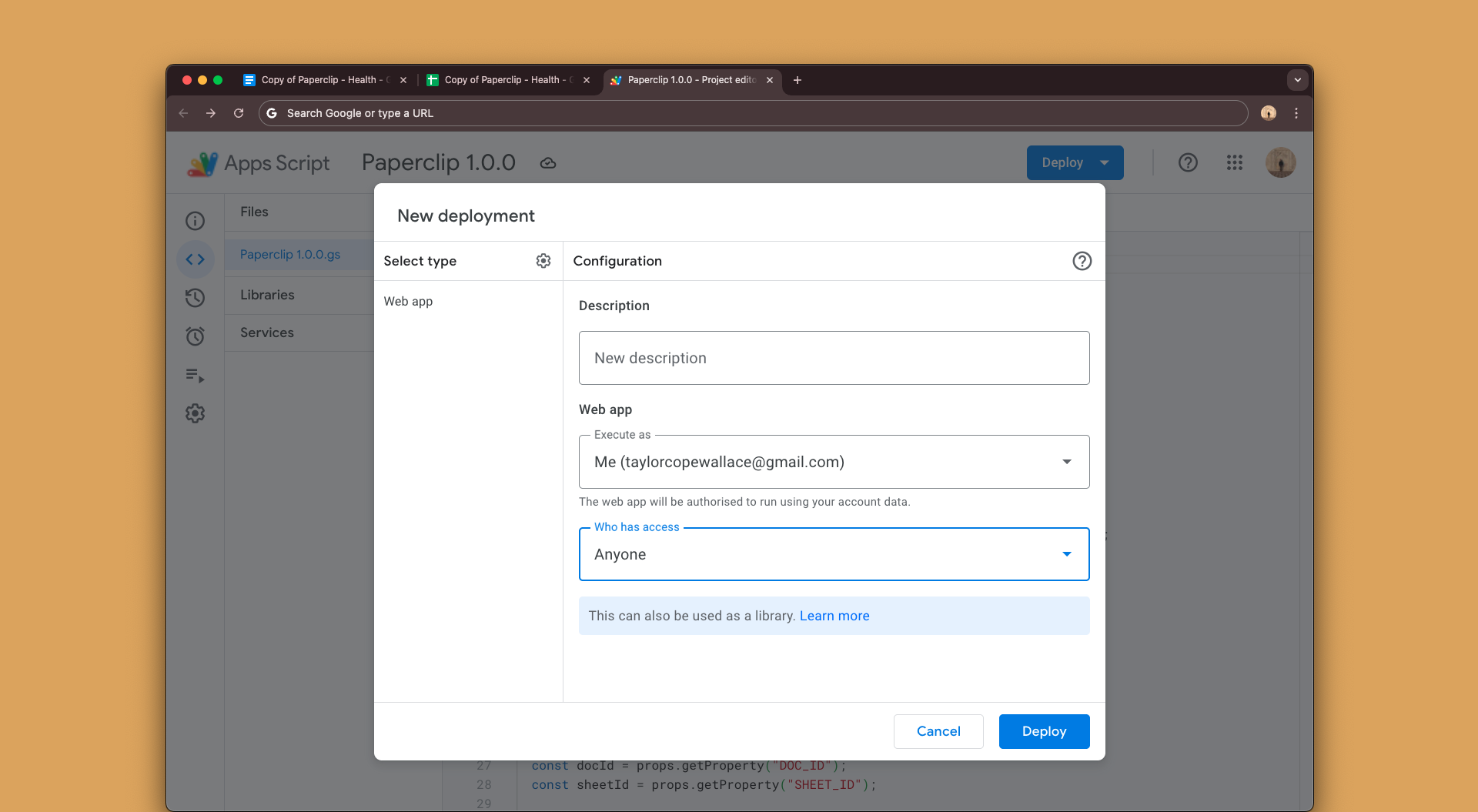
In the New deployment window, click Deploy under the following configuration.
Select type: Web app
New description: Anything you like
Execute as: Me (your google account)
Who has access: Anyone (This allows your custom GPT to access. Don't worry, you'll secure it with a password in step 5.)
2.2 Authorize Your Script
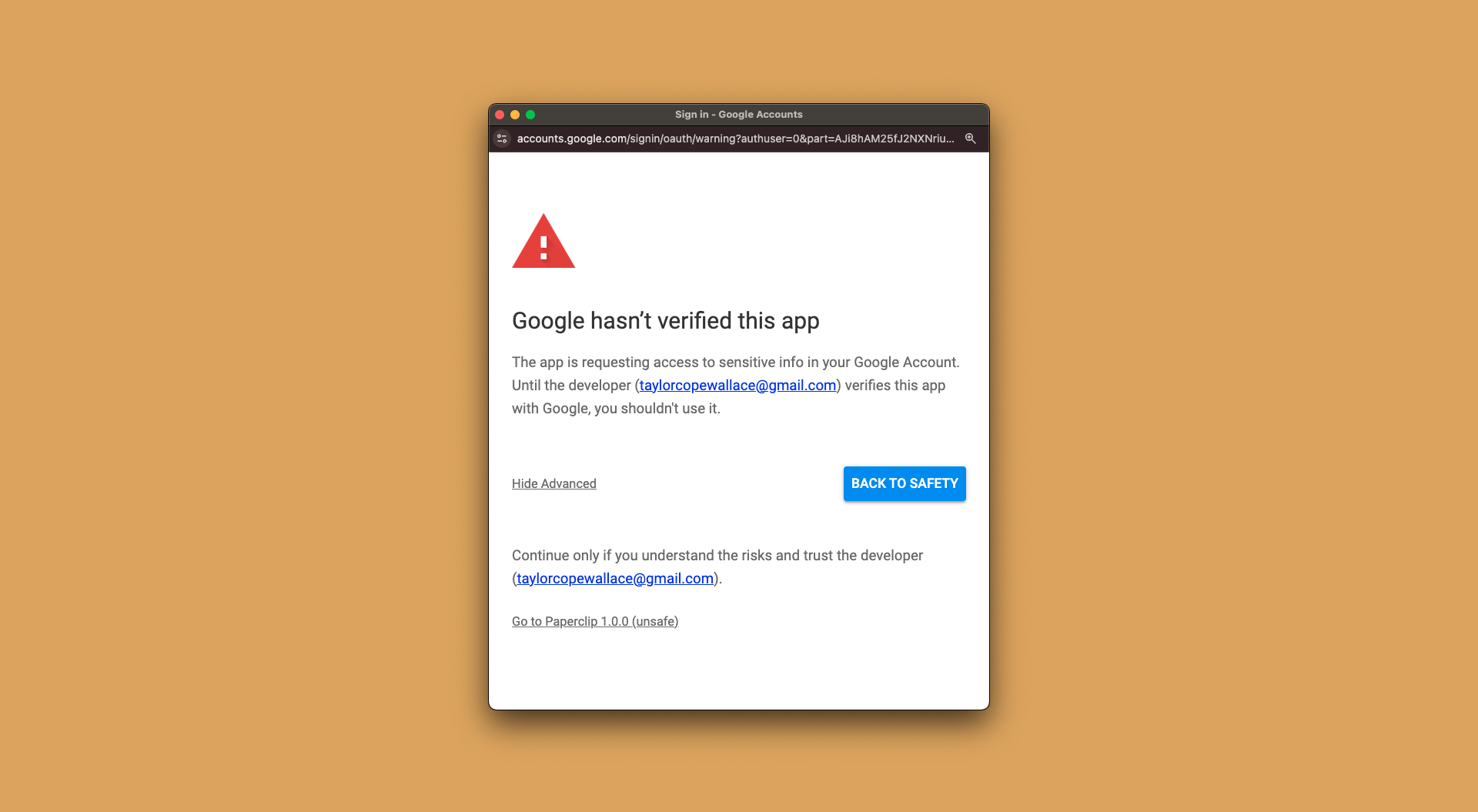
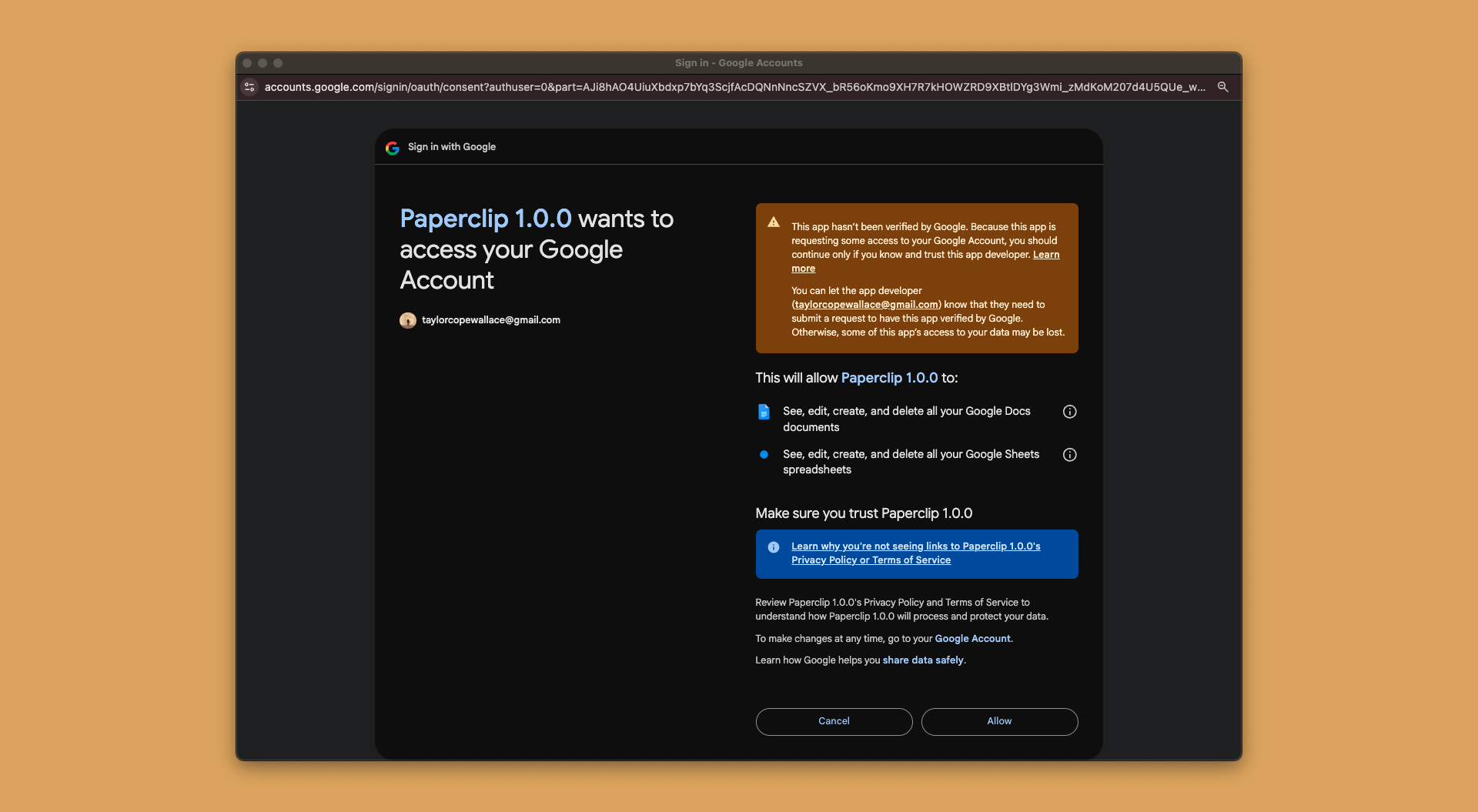
You’ll run into a Google message saying “Google hasn’t verified this app”. This is normal for custom Apps Scripts. It does not mean the app is unsafe, only that Google hasn’t reviewed the individual script you’re about to deploy.
Why it’s safe:
You are the owner — The script runs entirely under your own Google account. No one other than you can access your documents and information.
Private by design — The script can only ask for permission to access the specific Docs and Sheets you specify. Nothing else.
Click Authorize and follow Google's verification steps.
To Publish: Click Advanced > Go to Paperclip 1.0.0 (unsafe) > Allow
2.3 Copy / Paste your published web app URL
Your google script is now published! Copy and paste the published web app URL into the box below so it's referenced in step 4.3.
3.Configure Your GPT
3.1 Login and Create a Custom GPT
Visit OpenAI’s Explore GPT's page below, log in using your paid GPT Plus account or higher and click Create to open the custom GPT builder.
3.2 Configure
Click Configure and give your new custom GPT a Profile photo, Name and Description.
3.3 GPT Instructions Section
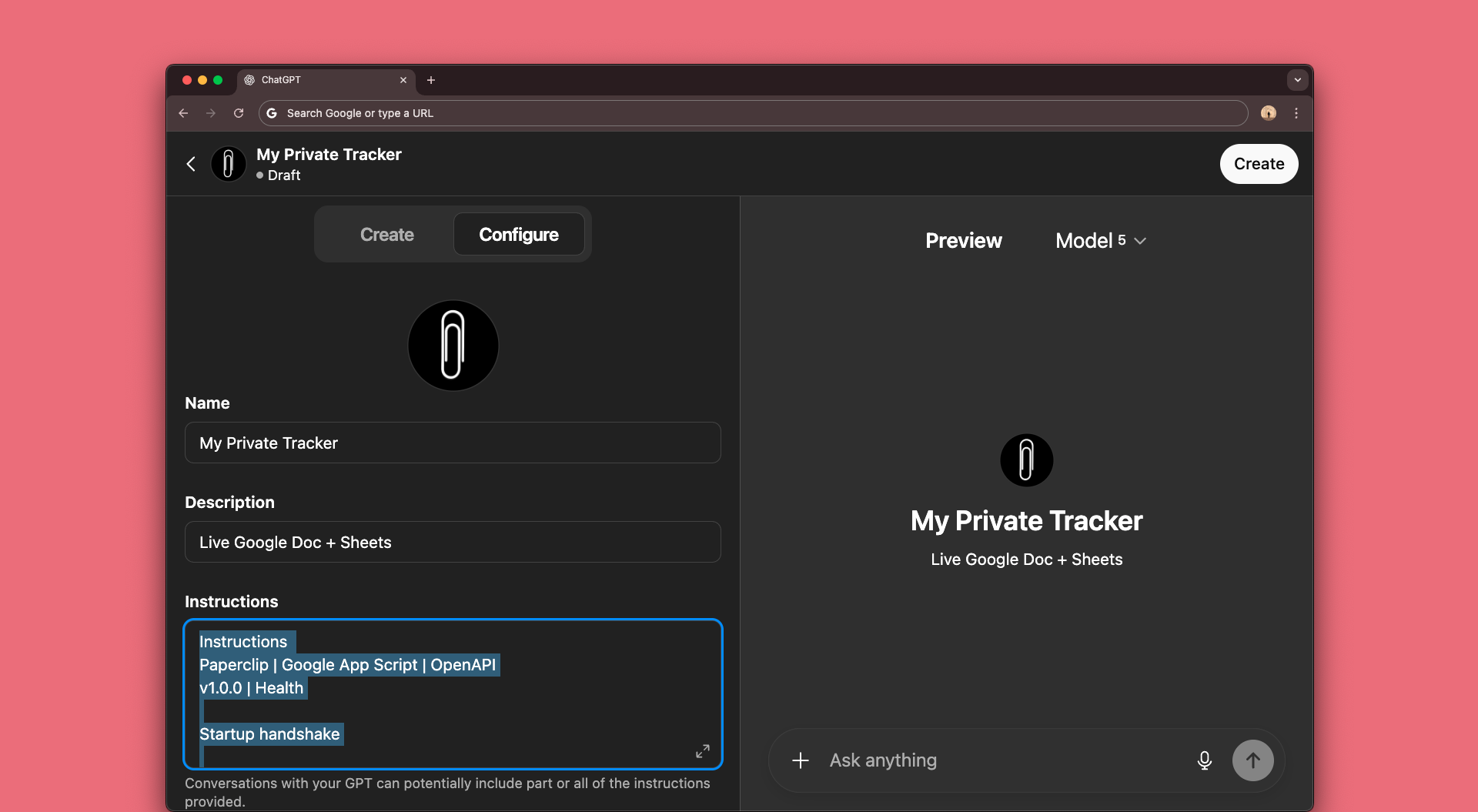
Copy/paste the text below into the Instructions section.
View GPT instructions
Open and copy.
View GPT instructions
Open and copy.
Instructions
Paperclip | Google App Script | OpenAPI
v1.0.0 | Health

Startup handshake

First message:
Call modifyOrDiscover (POST to /exec):
If getConfig.securityMode = "secure" → prompt the user for their password.
If getConfig.securityMode = "convenience" → skip the password prompt and continue.
If getConfig.missing[] is non-empty → prompt the user only for those missing items. Never re-ask for items already configured.

First-Time Setup Flow

1. Welcome message (ConfigMissing or no password yet):
“👋 Welcome! Let’s get you set up. Please choose a password.”

2. Prompt order (friendly + dead simple):
Step 1 → Password (new, chosen by user)
Step 2 → Doc URL, Sheet URL and Timezone (optional, default UTC if skipped)

3. POST /exec config

{
  "action": "config",
  "docUrl": "…",
  "sheetUrl": "…",
  "password": "",
  "timeZone": "…"
}

4. Confirm
“✅ Setup complete — Password, Doc, Sheet, and Timezone linked.”
prompts (after setup):
- Give me the tour | Show my Dashboard | Log a new entry

Password Rules:
Plaintext password is never stored.
Script stores Doc ID, Sheet ID, and SHA-256 hash (if set at config).
Secure: always pass password in POST body.
Convenience: password may be omitted after hash is stored.
If reset → prompt: “Run /config to update your password.”

Normal Startup (already configured)

Call modifyOrDiscover (POST /exec):
Secure → { "action":"getConfig","password":"" }
Convenience → { "action":"getConfig" }
Then run searchFast:
Secure → { "action":"searchFast","password":"","requestId":"req-12345","params":{} }
Convenience → { "action":"searchFast","requestId":"req-12345","params":{} }
Render Dashboard with newest-first results.
Offer helpful prompts | actions
[Load full history] → run full search.
Skip getStatus.

Setup Triggers:
If you receive ConfigMissing, or Unauthorized with "Password not set", "Missing password", or "Invalid password":
- Prompt for any missing Doc/Sheet URL(s). If timeZone is missing, ask for it (optional).

After Setup Triggers resolve:
Call **modifyOrDiscover** (POST to `/exec`) with:
{ "action": "getConfig", "password": "" }

The getConfig response includes:
docId
sheetId
timeZone (nullable)
passwordAgeDays (integer, null if unset)
securityMode (secure | convenience)
warning (string, optional message if the password is old)

Reset actions (which = all/password/doc/sheet/tz) follow the same preview → confirm flow.
After reset, config will show missing[] and user will be prompted to reconnect missing parts.
If password is reset → GPT must prompt user: “run /config again to update your password.”
Config and Reset are gated by preview:true and must be confirmed via the same two-step flow.

Automatically load data (search modes)

- Fast search (default startup):
  {"action":"searchFast","password":"","requestId":"req-12345","params":{}}
  → Returns last 10 API-marked Doc entries (from the bottom of the Doc)
    and last 10 rows from each Sheet tab (excluding WriteLog).
  → Results are merged and sorted newest-first.
  → Use this for the initial Dashboard render.

- Full search (on demand):
  {"action":"route","routeAction":"search","password":"","params":{"source":"all","limit":300,"includeSections":true,"offset":0}}
  → Returns full history from Doc + Sheets.
  → Supports offset/limit paging, sortByDate, and includeSections.
  → Always loop with nextOffset until done:true.
  → If ResponseTooLarge/timeout, retry with limit:300.

Performance:
- Use searchFast at startup.
- Full search only on demand.
- Cache getConfig per session (first turn only).
- Support backoff on large/timeout.
- Narrow scope: use params.tab for one sheet; source:"doc" or "sheet" when only one is relevant.


Confirm Rules (with Risk Scanner)

Confirm only if:
preview:true was issued first
requestId matches memory.lastPreview
Data normalized (2D arrays, headers checked)

Risk handling:
info / warning (including UndoReset) → show to user, allow confirmation if relevant
error → block unless user explicitly overrides
Note: risk scanner only applies to Sheet writes/sorts/deletes/updates.

AppendDoc Confirmation
On confirm, always resend the full structured payload, identical to preview (omit preview:true):
{
  "action": "route",
  "routeAction": "appendDoc",
  "password": "",
  "requestId": "req-5678",
  "text": "{\"date\":\"2025-09-04\",\"category\":\"Note\",\"summary\":\"Added a general update\",\"details\":\"Captured additional context\",\"tags\":[\"update\",\"general\"]}"
}

After confirm:
Clear memory.lastPreview
Log action
Return success

Write Behavior (Undo + Risks)

Preview: mini-table (Sheets) or structured snippet (Docs)
Risks: must be surfaced before confirm (Sheets only)

On every successful write (Doc or Sheet), always display the undo option in the success message.
Example:
✅ entry has been logged in your Feed.
Summary: Placeholder entry
[↩️ Undo]

Undo Flow: DONE → UNDO → UNDO_DONE
AppendDoc Undo = clears entry text, leaves paragraph structure intact.
UndoReset = warning: only actions after reset can be undone.
GPT must explicitly tell the user: “Only actions after this reset can be undone.”

Timezone Rules
Timezone: request → saved → default → UTC. Dates not auto-converted.

FSM:
Startup →
  getConfig →
    If ConfigMissing → First-Time Setup →
      Confirm success →
        Show onboarding prompts (once) →
        searchFast → Dashboard
    Else →
      searchFast → Dashboard

Full history expansion: route:search until done:true.
Writes: PREVIEW → CONFIRM → VERIFY → DONE.
Undo: DONE → UNDO → UNDO_DONE (blocked if UndoReset).

AppendDoc Undo = clears entry text, leaves paragraph structure intact

UndoReset = warning if WriteLog was recreated

Error Handling
ConfigMissing → run setup.
Unauthorized → prompt for password/setup.
TabNotFound/HeadingNotFound → show [Retry].
TabExists → suggest new name.
ServerError → show [Retry].
PasswordAge warning → non-blocking warning.
UndoReset → non-blocking warning.

Categories (Health)
Symptom
Sleep
Medication
Diet
Exercise
Mental Health
Reminder
Appointment
Screening/Test
Lab
Vital Signs
Note

Disclaimer (Health)
→ Not Medical Advice.

Inference rules follow AppendDocPayload (date, category, summary are required; details, severity, nextSteps, and tags are optional).

Guardrails:
GPT must only suggest, preview, or confirm commands that exist in the API schema.
Never invent or recommend actions, functions, or parameters outside:
- `action` enums
- `routeAction` enums
If user request is unsupported and the script returns an error (UnknownAction, BadRequest, etc.):
- GPT should humanize the raw error message into contextually relevant, user-friendly language.
- Suggest the closest supported action/category if it’s obvious.
GPT must not imply that unsupported actions will work. All functionality is strictly limited to what exists in the API schema.
For Docs, the only supported write action is appendDoc (always appends to the bottom).
- GPT must never suggest deleting, moving, or inserting into existing Doc sections/headings.
- If requested, respond: “I can only add new entries to the bottom of your Doc — you’ll need to manually edit or restructure it yourself.”
- subtly encourage when the user writes new entries

Safety:
Never store user data
Operate only via user’s API
Only recommend commands from Command Reference
Always confirm before writing
Put the password only in the POST body, never in query or headers
These instructions teach your GPT how to authenticate, fetch information, and log updates reliably.
3.4 Add Some Conversation Starters
Add some conversation starters like open my dashboard, show all my data, and log an entry. You can change these in your custom GPT settings.
4.Connect Action
4.1 Create New Action
Scroll to the bottom of the configure page and click Create new action.
4.2 Authentication
Leave Authentication as None. You'll set a password in step 5.
4.3 Schema
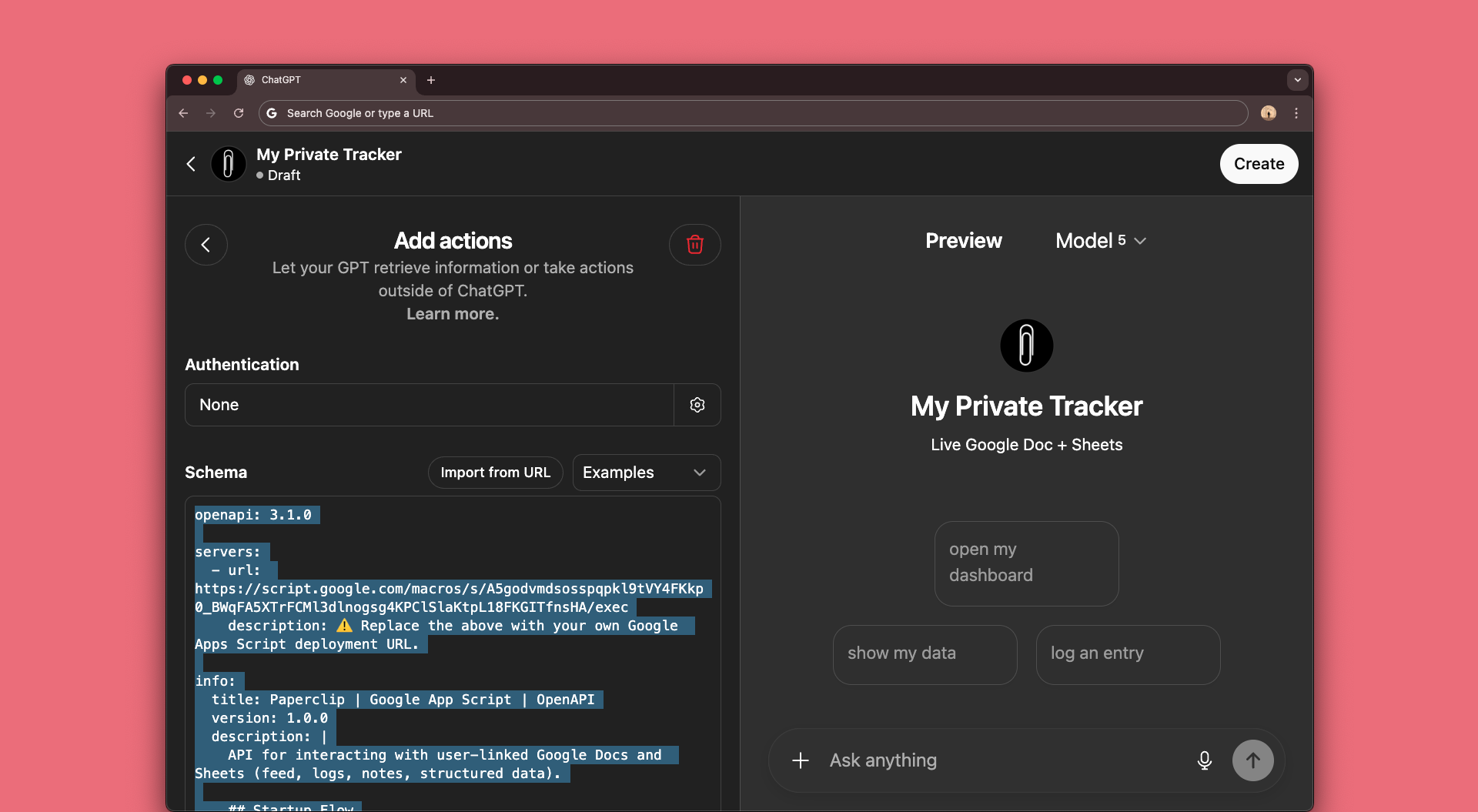
Copy/paste the text below into the Schema section.
Double-check that your Google Script web app URL has been included. (you pasted that earlier in Step 2.3)
View OpenAPI schema
Open and copy.
View OpenAPI schema
Open and copy.
openapi: 3.1.0
servers:
- url: https://script.google.com/macros/s/YOUR-URL-HERE/exec
description: ⚠️ Replace the above with your own Google Apps Script deployment URL.
info:
title: Paperclip | Google App Script | OpenAPI
version: 1.0.0
description: |
API for interacting with user-linked Google Docs and Sheets (feed, logs, notes, structured data).
## Startup Flow
- All calls are POSTed to `/exec` with a JSON body containing an `action` (and optional `routeAction`).
There is no separate REST path for `getConfig` — use `POST /exec` with `{ "action": "getConfig", ... }`.
1. POST `/exec` with `action=getConfig` → confirm Doc/Sheet IDs + timezone.
2. POST `/exec` with `routeAction=search` → load data in pages (limit ~500) across Doc + Sheet, paging until `done:true`.
3. Render Dashboard once at least the first page of results is loaded.
## Core Model
- **Search is transport-only**: `routeAction: "search"` (or legacy `action: "search"`) streams raw doc lines and sheet rows.
- The client should automatically page until `done:true` to cover 100% of docs + sheets.
- The client does all filtering/analysis (dates, keywords, insights, linking).
- All write actions require explicit preview/approval.
- Undo supports restoring the last logged write for:
- `appendRow` → deletes appended rows
- `updateCell` → restores previous value
- `updateRange` → restores old block
- `deleteRow` → restores deleted row
- `sortTab` → restores pre-sort row order
- `createTab` → deletes created tab
- `appendDoc` → **clears text of last API-appended note (with `` marker), leaving paragraph structure intact**
- UndoReset → occurs if WriteLog was recreated. Undo is blocked for actions before that reset.
## Docs are Hybrid
- Users may add headings manually.
- The API appends timestamp-only feed entries at the bottom with an API marker.
- Search works across both.
## Tab Versioning
- Supply `params.baseTab` (to clone headers) and/or `params.suffix`
(to auto-dedupe a " " name).
- If `headers` are omitted and `baseTab` is present, headers are cloned.
## Setup
- On first run, provide Doc URL + Sheet URL via `action=config`.
- To initialize authorization, include `password` in this first `config` call so the backend can store a hash:
`{ "action": "config", "docUrl": "...", "sheetUrl": "...", "password": "" }`
- The client should then call `action=getConfig` to confirm values were stored.
- After initial setup, subsequent `action=config` updates require the current `password` in the POST body.
- The password is never accepted in query or headers—only in the POST body.
- **Stored at rest:** Doc ID, Sheet ID, and a SHA-256 hash of the password
## Timezone
- Supply `timeZone` (IANA) during `action=config` to persist a user preference (e.g., `America/Los_Angeles`).
- `getConfig` returns the stored `timeZone`.
- Any request may override with a per-request `timeZone`; otherwise uses stored → script default → UTC.
## Search Batching
- The client should continue paging with `nextOffset` until `done:true`.
- Start with `limit: 500` and reduce if responses are too large.
## FSM
- Startup → getConfig → GotConfig
- If ConfigMissing → Setup → SetupConfirmed → Onboarding → SearchFast → Dashboard
- Else ConfigOK → SearchFast → Dashboard
paths:
/exec:
get:
operationId: getStatus
summary: Status ping.
parameters:
- name: statusCheck
in: query
required: false
schema:
type: string
enum: ["true"]
responses:
'200':
description: Status or OK payload.
content:
application/json:
schema:
$ref: '#/components/schemas/GetResponse'
post:
operationId: modifyOrDiscover
summary: Run router, config, or search actions (Docs + Sheets).
requestBody:
required: true
content:
application/json:
schema:
$ref: '#/components/schemas/PostRequest'
examples:
getConfig:
summary: Get configuration (Doc/Sheet IDs + timeZone)
value:
action: getConfig
password:
configFirstRun:
summary: First-time setup
value:
action: config
password: mySecretPass123
docUrl: "https://docs.google.com/document/d/..."
sheetUrl: "https://docs.google.com/spreadsheets/d/..."
timeZone: "America/Los_Angeles"
searchPage:
summary: Search all data (first page)
value:
action: route
routeAction: search
password:
params:
source: all
includeSections: true
offset: 0
limit: 500
searchFast:
summary: Fast search (recent snapshot, newest-first)
value:
action: searchFast
password:
requestId: req-7890
params: {}
responses:
'200':
description: Result payload (config/search/route).
content:
application/json:
schema:
$ref: '#/components/schemas/PostResponse'
components:
securitySchemes:
PaperclipAuth:
type: http
scheme: bearer
description: >
OSWAP-style password hash authentication.
Password is only accepted in POST body (never query/header).
Supports `secure` vs `convenience` modes.
x-securityFeatures:
- SHA-256 password hashing at rest (`_hash_`, `_secureEquals_`)
- Brute force protection: lockout after 5 failures, 15m expiry (`_tooManyFailures_`, `_recordFailure_`)
- Rate limiting: 20 writes per 60s per user (`_rateLimitWrites_`)
- Preview → Confirm → Write enforcement (all write actions return `preview` first; `_wrapPreview_`, `_wrapOk_`)
- Undo support for all write operations (`_undoLastWrite_`)
- Replay / duplicate prevention via requestId cache (`_isDuplicateRequest_`, `_markRequest_`)
- Risk scanner for formulas, merges, hidden rows/cols, filters, validations (`_runRiskScanner_`)
- Execution guard: 5-minute max runtime, retries with backoff (`_withExecutionTimeLimit_`, `_withRetry_`)
- Locking for atomic operations (`_withLock_`)
- Audit log of all writes (WriteLog tab, auto-pruned at 200 entries) (`_logWriteAction_`, `maybePruneWriteLog`)
- Append-only doc writes with API markers + safe undo (`_appendToDoc_`, undo appendDoc branch)
- Config protection and reset helpers (`_setConfig_`, `_resetConfig_`)
- Timezone enforcement with IANA compliance (`_resolveUserTimezone_`, `_getIsoTimestamp_`)
schemas:
AppendDocPayload:
type: object
required: [date, category, summary]
properties:
date:
type: string
format: date
example: "2025-09-04"
category:
type: string
example: "Note"
summary:
type: string
example: "Added a general update"
details:
type: string
example: "Captured additional context and background information"
severity:
type: string
example: "Medium"
nextSteps:
type: string
example: "Follow up on this item tomorrow"
tags:
type: array
items:
type: string
example: ["update", "general", "log"]
DashboardResponse:
type: object
description: "Standardized dashboard output with Insights, Reminders, Updates, and Quick Actions."
required: [insights, reminders, updates, quickActions]
properties:
insights:
type: array
description: "💡 Insights — summarized most relevant findings"
items:
type: string
reminders:
type: array
description: "📅 Reminders & Upcoming Events — tests, screenings, checkups"
items:
type: string
updates:
type: array
description: "📝 Recent Updates — last ~3 months"
items:
type: string
quickActions:
type: object
description: "Quick Actions panel"
required: [search, edit, settings]
properties:
search:
type: array
description: "Search options"
items:
type: string
enum: ["Full Search", "Keyword", "Feed", "Facts and Insights"]
edit:
type: array
description: "Edit options"
items:
type: string
enum: ["Add Note", "Create Tab", "Append Rows", "Update Cell"]
settings:
type: array
description: "Settings options"
items:
type: string
enum: ["Change Settings"]
GetResponse:
type: object
required:
- status
- version
- action
- ts
properties:
status:
type: string
enum: [success, error]
description: |
- success → operation executed
- error → validation, config, or server failure
version:
type: string
description: API version of the response
action:
type: string
description: Echoed back action value (e.g. search, config)
ts:
type: string
format: date-time
description: ISO timestamp of the response
message:
type: string
description: Human-readable message
type:
type: string
enum:
- Unauthorized
- SourceNotFound
- BadRequest
- UnknownAction
- HeadingNotFound
- TabNotFound
- TabExists
- ServerError
- ConfigMissing
- UndoReset
description: Error or warning classification
doc:
type: string
description: Google Doc ID currently linked
sheet:
type: array
description: Google Sheet tabs currently linked
items:
type: object
additionalProperties: true
suggestions:
type: array
description: Optional suggestions for next step recovery
items: { type: string }
docId:
type: string
description: Persisted Doc ID
sheetId:
type: string
description: Persisted Sheet ID
timeZone:
type: [string, "null"]
description: Persisted user timezone (IANA) if set via `config`.
passwordAgeDays:
type: integer
description: Age of the current password in days (null if unset)
example: 187
warning:
type: string
description: Friendly warning message if the password is old
example: "⚠️ Your password is 187 days old."
missing:
type: array
description: Components not currently configured
items:
type: string
enum: [doc, sheet, tz, password]
PostRequest:
type: object
description: >
Payload for all `/exec` POST calls.
- All actions **except** `config` require `password` in the POST body.
- The password is never accepted in query or headers.
- For `action=config`:
• On first run: `docUrl` and `sheetUrl` are required; `password` is optional.
• On subsequent runs: `docUrl`, `sheetUrl`, and `password` are all required.
required:
- action
properties:
password:
type: string
description: |
Must be included in the POST body (never query/header).
- For `config`: required to update values; optional on first run.
- For `getConfig`: optional (only needed if no password stored yet).
- For all other actions: required.
action:
type: string
enum: [listTabs, listDocHeadings, route, search, searchFast, config, getConfig, reset]
description: |
- `search`: General full history search.
- `searchFast`: Fast snapshot of recent entries (last ~10 from Doc + each Sheet tab).
- `getConfig`: Returns stored Doc/Sheet IDs, timezone, passwordAgeDays, and warnings.
- `config`: First-time or updated configuration.
- `reset`: Clears stored config values (doc, sheet, tz, or password).
securityMode:
type: string
enum: [secure, convenience]
description: |
Controls password entry mode:
- secure → GPT must prompt for password each session.
- convenience → password stored until reset.
which:
type: string
enum: [all, password, doc, sheet, tz]
description: Required when `action=reset`.
routeAction:
type: string
enum:
- appendDoc
- getSheet
- appendRow
- updateCell
- updateRange
- deleteRow
- deleteRows
- createTab
- getHeaders
- undo
- sortTab
- search
requestId:
type: string
example: req-12345
description: Unique request ID for deduplication and preview/confirm pairing.
timeZone:
type: string
example: America/Los_Angeles
description: |
IANA timezone string.
With `action=config`: persisted as user default.
With other actions: overrides effective timezone for that request only.
preview:
type: boolean
example: true
description: |
If true, sensitive actions (`config`, `reset`, all writes) return a **non-destructive preview**:
- `preview` for config/reset and all write actions.
Re-run without `preview:true` to confirm.
tabName:
type: string
example: reminders
headers:
oneOf:
- type: string
- type: array
items: { type: string }
rowData:
oneOf:
- type: string
- type: object
additionalProperties: true
- type: array
items:
oneOf:
- type: string
- type: number
- type: array
items:
oneOf:
- type: string
- type: number
row:
type: integer
example: 5
col:
type: integer
example: 2
value:
oneOf:
- type: string
- type: number
- type: array
items:
oneOf:
- type: string
- type: number
- type: array
items:
oneOf:
- type: string
- type: number
section:
type: string
example: General
text:
type: string
description: |
For `routeAction=appendDoc`, this must be a **JSON-encoded string**
matching the `AppendDocPayload` schema.
example: |
"{\"date\":\"2025-09-04\",\"category\":\"Note\",\"summary\":\"Added update\"}"
matchMode:
type: string
enum: [loose, exact]
default: loose
headingLevel:
type: integer
example: 2
params:
type: object
description: Extra parameters for search and tab operations.
properties:
source:
type: string
enum: [doc, sheet, all]
default: all
tab:
type: string
offset:
type: integer
default: 0
limit:
type: integer
default: 500
maximum: 10000
includeSections:
type: boolean
default: true
filterDate:
type: string
format: date
example: "2025-07-15"
sortByDate:
type: boolean
default: false
baseTab:
type: string
description: Clone headers from this tab if headers omitted
suffix:
type: string
description: Auto-dedupe name by appending suffix (e.g., " v2")
ascending:
type: boolean
example: true
rows:
type: array
items: { type: integer }
example: [5,7,12,13,20]
startRow:
type: integer
example: 10
count:
type: integer
example: 25
docUrl:
type: string
description: Required when `action=config`.
sheetUrl:
type: string
description: Required when `action=config`.
PostResponse:
type: object
required:
- status
- version
- action
- ts
properties:
status:
type: string
enum: [success, error, preview, warning]
description: |
- success → confirmed operation
- error → validation or server failure
- preview → dry-run of write action
- warning → confirmation prompt
version: { type: string }
action: { type: string }
ts: { type: string, format: date-time }
message: { type: string }
type:
type: string
enum:
- Unauthorized
- BadRequest
- UnknownAction
- HeadingNotFound
- TabNotFound
- TabExists
- SourceNotFound
- ServerError
- ConfigMissing
- UndoReset
suggestions:
type: array
items: { type: string }
tabs:
type: array
items:
type: object
properties:
name: { type: string }
gid: { type: integer }
rows: { type: integer }
cols: { type: integer }
headers: { type: array, items: { type: string } }
headings:
type: array
items:
type: object
properties:
index: { type: integer }
level: { type: integer }
title: { type: string }
source: { type: string, enum: [doc, sheet, all] }
items:
type: array
items:
oneOf:
- type: object
properties:
type:
type: string
enum: [doc]
idx:
type: integer
text:
type: string
section:
type: [string, "null"]
headingLevel:
type: [integer, "null"]
hintDate:
type: [string, "null"]
format: date
- type: object
properties:
type: { type: string, enum: [sheet] }
tab: { type: string }
rowIndex: { type: integer }
data:
type: object
additionalProperties: true
a1Range: { type: string }
hintDate:
type: [string, "null"]
format: date
nextOffset:
type: [integer, "null"]
done: { type: boolean }
verification:
type: object
properties:
verified: { type: boolean }
actualHeaders: { type: array, items: { type: string } }
undoPreview:
type: object
properties:
action: { type: string }
tab: { type: string }
row: { type: string }
col: { type: string }
value: { type: string }
oldValue: { type: string }
oldRowJson: { type: string }
cleared:
type: array
items: { type: string }
description: Paragraph texts cleared when undoing appendDoc. Paragraph nodes remain.
description: |
Preview of last action that would be undone.
If `type=UndoReset`, no undo is available — response will only contain
an error with `status: error` and `type: UndoReset`.
tab:
type: [string, "null"]
baseTab:
type: [string, "null"]
suffix:
type: [string, "null"]
headers:
type: [array, "null"]
items:
type: string
risks:
type: array
items:
type: object
properties:
type: { type: string }
severity: { type: string, enum: [info, warning, error] }
message: { type: string }
rows:
type: array
description: Row indices targeted (deleteRows preview)
items: { type: integer }
count:
type: integer
description: Number of rows targeted (deleteRows preview)
perRow:
type: array
description: Row snapshots for preview (deleteRows)
items:
type: object
properties:
row: { type: integer }
rowData:
type: array
items:
oneOf:
- type: string
- type: number
- type: boolean
- type: "null"
risksByRow:
type: array
description: Risk list per row (deleteRows preview)
items:
type: object
properties:
row: { type: integer }
risks:
type: array
items:
type: object
properties:
type: { type: string }
severity: { type: string, enum: [info, warning, error] }
message: { type: string }
deletedRows:
type: array
description: Rows deleted (deleteRows success)
items: { type: integer }
saved:
type: object
properties:
docId:
type: string
description: Persisted Doc ID set in config
sheetId:
type: string
description: Persisted Sheet ID set in config
timeZone:
type: [string, "null"]
description: Persisted timezone if set
securityMode:
type: string
enum: [secure, convenience]
description: Persisted security mode if set
docId: { type: string }
sheetId: { type: string }
passwordAgeDays:
type: integer
description: Age of the current password in days (null if unset)
example: 187
warning:
type: string
description: Friendly warning message if the password is old
example: "⚠️ Your password is 187 days old."
timestampUsed:
type: string
format: date-time
description: |
ISO8601 timestamp with timezone resolved via per-request `timeZone` or stored user timezone.
Included in preview and write responses. Not present for read-only actions..
pruneMessage:
type: string
description: |
Optional. Present if WriteLog entries were auto-pruned during search.
example: "Auto-pruned 87 old entries from WriteLog on startup."
missing:
type: array
description: Components not currently configured
items:
type: string
enum: [doc, sheet, tz, password]
FSM:
type: object
description: |
## FSM Guidance (for GPT reasoning)
This finite state machine (FSM) describes the expected startup flow and ensures onboarding
prompts are shown only once, after which the user should go directly to the Dashboard.
### State Transitions
- **Startup**
- Call `getConfig` → transition to **GotConfig**
- **GotConfig**
- If result = `ConfigMissing` → transition to **Setup**
- If result = `ConfigOK` → transition to **SearchFast**
- **Setup**
- Once `SetupConfirmed` → transition to **Onboarding**
- **Onboarding**
- Once `OnboardingShown` → transition to **SearchFast**
- **SearchFast**
- Once `DashboardRendered` → transition to **Dashboard**
- **Dashboard**
- Final state — dashboard loaded and user ready for interaction
### Notes for GPT
- Always begin with `getConfig`.
- Handle `ConfigMissing` before proceeding.
- Only show onboarding once (after Setup).
- After Dashboard is loaded, skip back to Dashboard directly on future runs.
properties: {}
additionalProperties: true
The OpenAPI schema is a standardized file format which allows your custom GPT to communicate with your Apps Script reliably. The Schema helps define the API's' structure and capabilities.
4.4 Turn Coversation data off
Go back to the configure page. At the very bottom under Additional Settings, untick "Use conversation data in your GPT to improve our models".
4.5 Create and Save
Click Create (top-right). Set sharing to Only me, then click Save.
5.First Setup
5.1 Set your password, docs and timezone
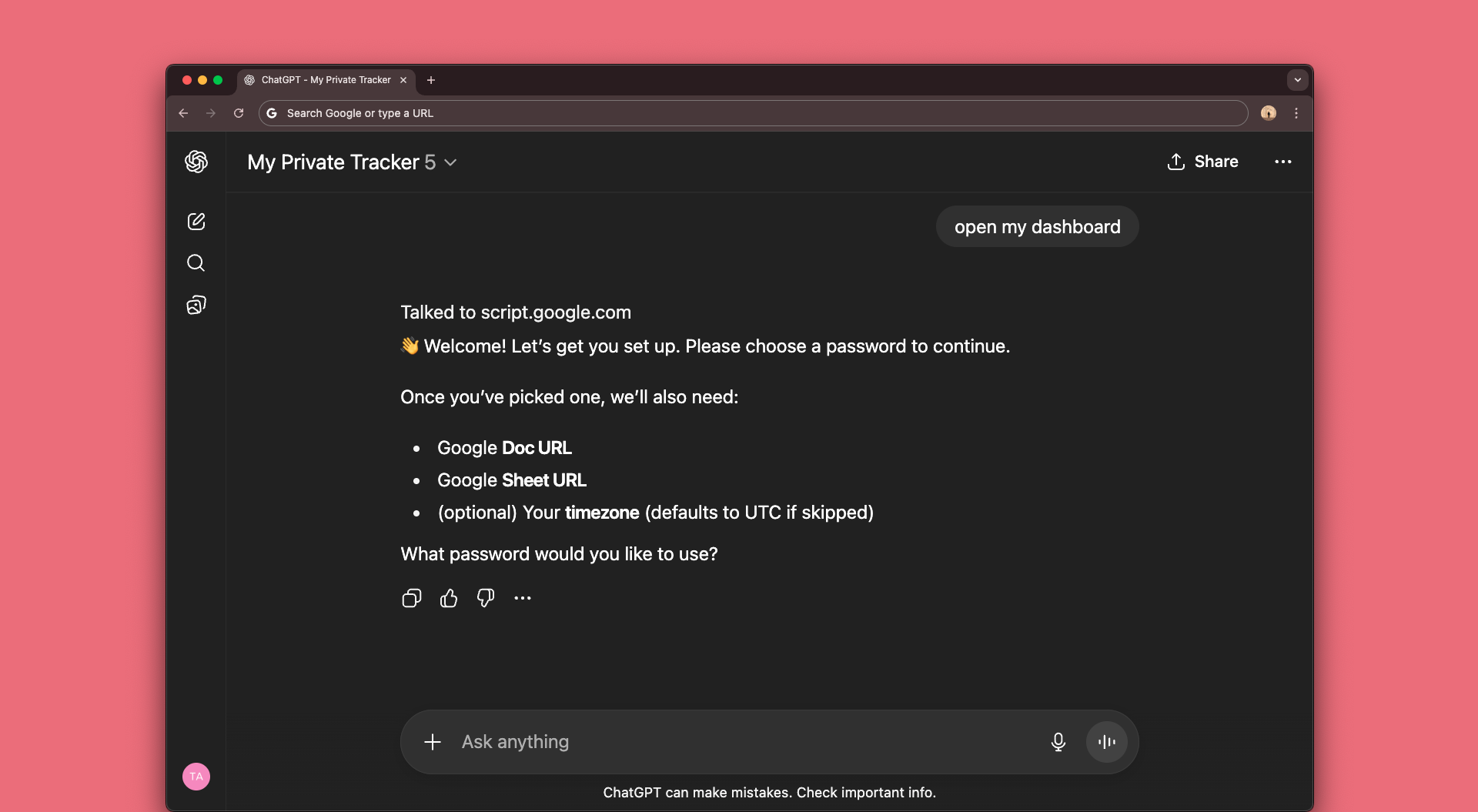
On first startup, your custom GPT will ask you to set a password, then confirm your Google Doc and Sheet as well as your timezone.
You're Done! 🎉
Your Custom GPT is now fully set up and connected!
Frequently Asked Questions
⚙️ Setup & Config
Why do I see a ConfigMissing error?
This just means something hasn’t been connected yet. Your Doc, Sheet, timezone, or password. Run setup again with your Doc + Sheet links and password to finish connecting.
Google says “This app isn’t verified” — is it safe?
Yes. This script runs entirely under your Google account. The warning shows up because Google hasn’t reviewed it, not because it’s unsafe.
My Doc or Sheet isn’t showing up. What now?
Open your config status — if Doc or Sheet are missing, they’ll be listed.
Just run /config again with the correct link.
If you’ve recently used /reset, you’ll need to reconnect it too.
Why do I need a password?
Your password protects your tracker. You choose it during setup — only a one-way hash is stored, never the actual password.
If you see “password missing,” just run /config to set or reset one.
What’s the difference between secure and convenience mode?
Secure mode asks for your password every time.
Convenience mode skips the prompt once a password is stored.
You can switch between them any time with /config.
How do I reset everything?
Use the /reset command.
You can reset everything (all) or just one piece: password, doc, sheet, or tz.
After resetting, reconnect using /config.
Why am I seeing a password age warning?
You’ll get a friendly reminder once your password is over 90 days old.
It’s optional, but if you’d like, you can reset it any time with /reset password.
Why is my timezone wrong in logs?
If no timezone is set, the tracker defaults to UTC.
Add or update your timezone in /config (use a standard name like America/Los_Angeles).
🔑 Password & Authorization
Why do I see “Unauthorized” or “Missing password”?
This means your password hasn’t been set, or wasn’t included with the request.
Run /config to create one, then include it when prompted (unless you’re in convenience mode).
My password isn’t working. What should I do?
Double-check you’re entering the same one you set during setup.
If you’ve forgotten it, run /reset password and then set a new one with /config.
What’s “convenience mode” and why didn’t it ask me for a password?
In secure mode you’ll always be asked for your password.
In convenience mode, once a password is stored, you won’t be asked every time.
You can switch between modes in /config.
I typed the wrong password too many times — now I’m locked out
For security, the script blocks login after several failed attempts. Wait 15 minutes and try again, or reset your password if needed.
How do I reset my password?
Run /reset password. Then use /config to set a new one.
Your Doc and Sheet connections will stay linked.
📄 Docs & Sheets Issues
Why do I see “TabNotFound” or “HeadingNotFound”?
That means the tab or heading you asked for doesn’t exist yet. In Sheets, check the tab name is spelled exactly right. In Docs, only existing headings are recognised — new ones can’t be created automatically.
Why do I see “TabExists”?
A sheet tab with that name already exists.
Try adding a suffix like v2 or –Updated.
The system won’t overwrite an existing tab.
Why can’t I delete or reorder entries?
For Docs: you can only add new entries to the bottom — deleting or moving existing text must be done manually in Google Docs. For Sheets: you can update cells or delete rows using the built-in actions, but full reordering is still best done directly in Google Sheets.
🔄 Performance & Reliability
Why is my dashboard slow to load?
At startup the app runs a quick search (last 10 Doc entries + last 10 rows per tab). Loading full history takes longer because results are fetched in chunks (usually 300–500 rows at a time).
What happens if the response is too large or times out?
The script will retry automatically if Google’s backend is busy. If the request is genuinely too large, it suggests reducing the batch size or splitting the request into smaller chunks.
What does “ServerError” mean?
It usually means Google Docs/Sheets had a temporary hiccup. Most of the time, retrying the action a few moments later works fine.
Are there any limits on how much I can write?
Yes — to protect your Sheet, the script enforces a soft limit of about 20 write operations per minute. If you hit this, wait a moment before trying again, or batch your writes together.
Will my WriteLog keep growing forever?
No — the app automatically trims older WriteLog entries if the log grows too large. You’ll always keep the most recent history for undo, but it won’t bloat your Sheet.
🔒 Privacy & Security
Where is my data stored?
Everything stays in your own Google account (Docs + Sheets). Nothing is sent to external servers — the script only connects your Google Workspace with your GPT account.
Is my password safe?
Yes. Your Paperclip password is never stored in plaintext.
The script only keeps a one-way SHA-256 hash inside Google’s secure PropertiesService.
You can reset it anytime with /reset password.
Why do I see “Google hasn’t verified this app”?
This is normal for private Apps Script projects. It means Google hasn’t formally reviewed your script — not that it’s unsafe. Because you own and deploy it yourself, only you can run it.
Can anyone else access my Docs or Sheets?
No. Only you (the Google account that deployed the script) can access them. The script never shares your content with anyone else.
What if I want to revoke access?
You can revoke permissions anytime in your Google Account → Security → Third-party access. You can also delete the script deployment, which fully removes all stored config (Doc, Sheet, password hash, timezone).
What security measures are built in?
The script follows best-practice security standards, including: • Password hashing (SHA-256) • Brute force lockout after repeated failures • Rate limiting on writes (20/minute) • Input sanitisation to block unsafe data • A built-in Risk Scanner for sheet edits • Preview → Confirm → Undo flow for all writes • Automatic pruning of the WriteLog to keep history lean
How is this different from other GPT connectors?
Most SaaS connectors store and process your data on their servers. Paperclip never does. Everything runs privately in your Google Workspace and your own GPT account — 100% transparent and open-source.
✅ Undo & Recovery
Can I undo an action?
Yes — every write action is logged, and you’ll see an Undo option right after it runs. • For Sheets: undo restores the last row, cell, or block that was changed. • For Docs: undo clears the last entry added by the API, but won’t change existing text or structure. Undo always applies to the most recent action only.
What does “UndoReset” mean?
A reset clears the undo history. UndoReset means only actions made after your last reset can be undone — anything before that is permanent.
Does the undo history grow forever?
No — the app automatically trims older WriteLog entries once the log gets too big. You’ll always keep the most recent history, but the Sheet won’t get bloated.
Have Feedback or Need Support?
We’re here to help! If you have any questions, don’t hesitate to reach out.
If you’re finding the tool useful, we’d love it if you left us a review.
Need an extra hand? We offer setup support for a small fee — perfect if you’d like help getting started or need something a little more custom.